

- March 9, 2024
- AI Tools
Have you ever wished creating stunning videos was as easy as typing a few words? With AI, now it’s a reality. Have no time, skills, or budget for professional video production? No problem.
AI video creators like Steve AI can do it for you. Is this tool suitable for you? Make a decision after reading my in-depth Steve AI review.
I’ll cover everything you need to know about this AI video tool. You’ll discover
Steve AI’s key features and capabilities.
Who it’s best suited for.
How it compares to leading alternatives like Kapwing and Clipchamp.
And most importantly – whether it’s worth the investment for your business.
By the end, you’ll have all the information needed. You can decide if Steve AI is the right automated video creation solution for your needs and budget.
What Does Steve AI Do, and Who Created It?
Steve AI is one of the top AI video creators. It enables you to create animations and live videos easily. Its AI integration selects the best creative elements for your video to deliver a message frame-per-frame. This platform makes animation and video creation easy for ad campaigns and social media.

Steve.AI is the brainchild of Animaker, the world’s first DIY video-making tool. It was founded in San Francisco in 2013 by Raghav.
Steve AI Review: Features and Options
As our team started using this tool for our video creation, it became clear that this was not just another tool. It enabled me to create professional videos effortlessly and of high quality.
It has a fantastic feature called Text-to-Videos. It picks up my scripts and figures out the suitable template and theme I would want in my video. It’s like having a creative assistant on tap.

Blog-to-Reels was exciting as well. It converted our written blogs into captivating videos in minutes. Paste the URL, and you can download the animations and videos with a few modifications.
The audio-to-video feature is simple to use. It turns podcasts and voice recordings into stunning animations and videos.
Script-to-video allows you to create professional videos fast. You can write your script from scratch or choose among 200+ templates. Feel free to use a Tweet instead of a script.
Thus, any video-making professional can benefit a lot from these functionalities. Now, we will look at the advantages and disadvantages of this tool.
Pros and Cons
Top Benefits of Steve AI: What Makes It Stand Out?
Is Steve.AI one of the most excellent video editing and animation tool solutions? It’s good, but it has some limitations as well.
Here’s what you get with this software:
Create unique videos with ease. You don’t need any prior knowledge.
Choose from many industry-specific templates, like education, e-commerce, and entertainment.
Create engaging videos with your own assets. Use props, objects, special effects, scenes, and characters for a dynamic viewing experience.
More than 1 million images.
100K graphics and icons.
1K animated characters.
30,000 music tracks.
200+ sample scripts.
Broad functionality.
Now, let’s look at its cons.
Any Cons? What Does It Fail to Do?
Yes, some areas may need a bit of improvement.
No phone app is available.
It uses standard voiceovers. There are no AI narrations.
Limited layout customization.
However, the price for this tool is affordable in comparison with other similar apps.
How to Use Steve AI to Create Videos: A Step-by-Step Process
It is easy and fast to make your videos with this tool. All you need to do is follow these steps:

The first step is to come up with a script for your video.

Select from various sizes, templates, scenes, and customizations.
Let the AI technology do the rest and turn your script into an animated video.
Pick your styles, colors, and fonts to finalize the video, then share it on social or embed it on your website.
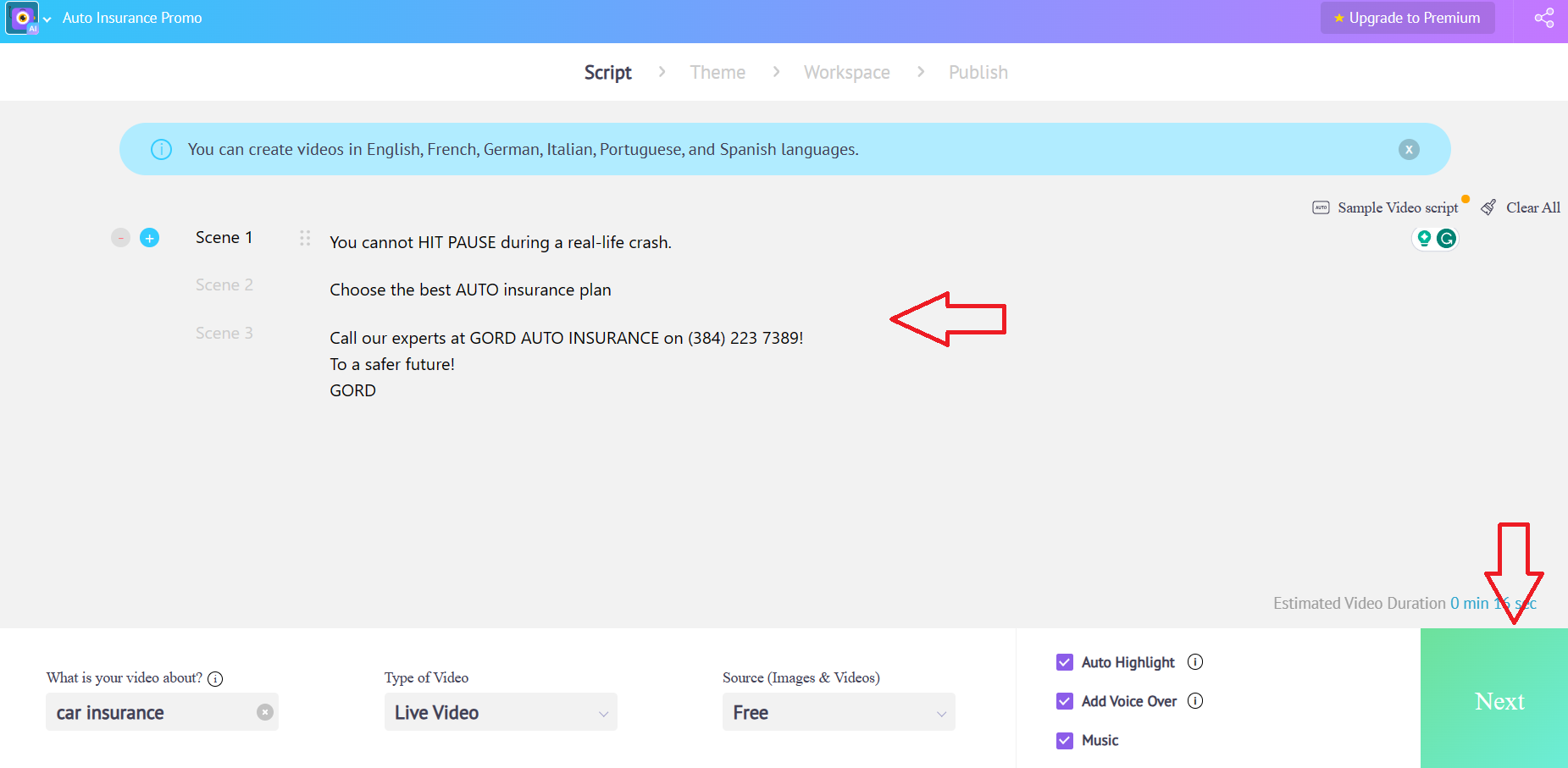
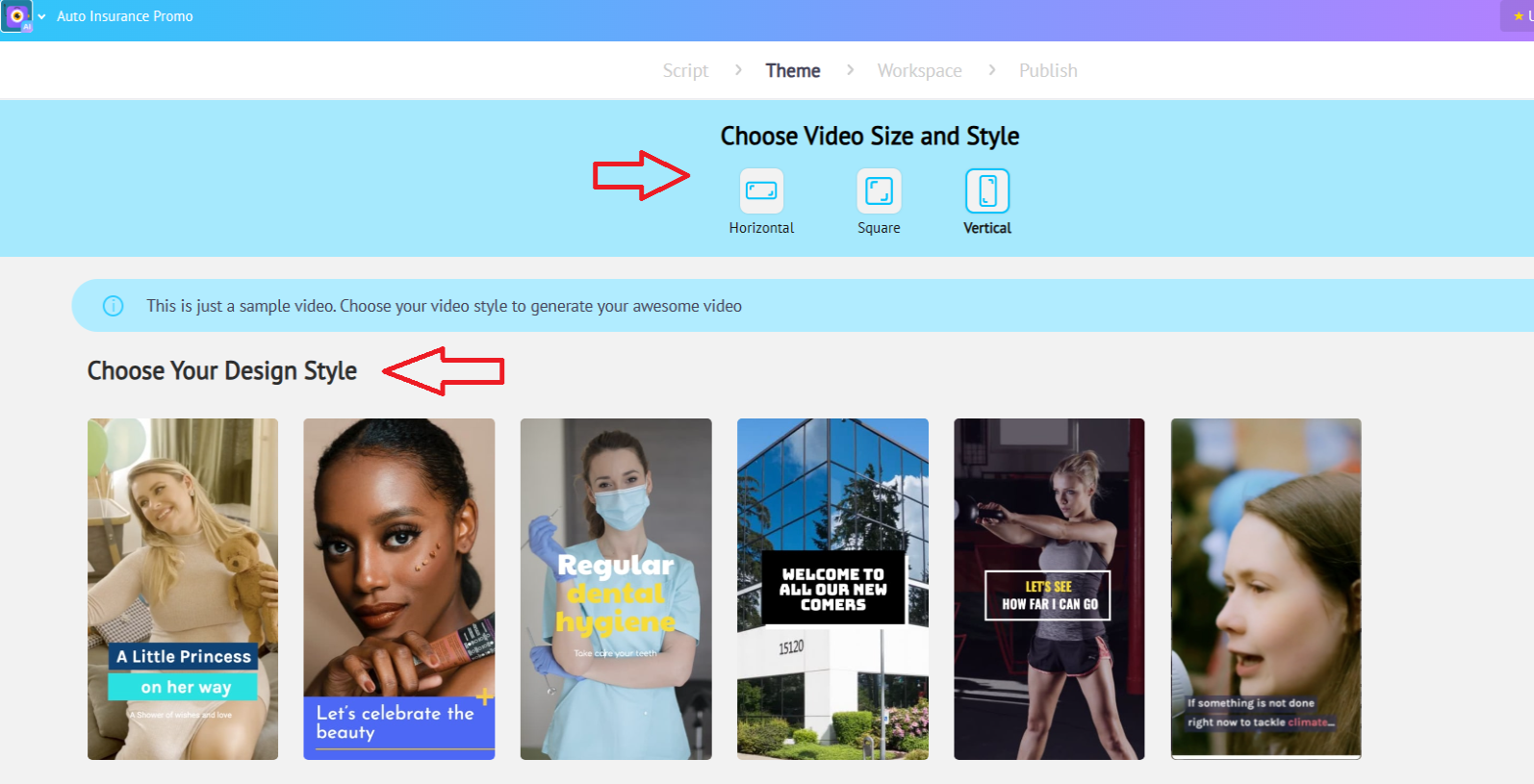

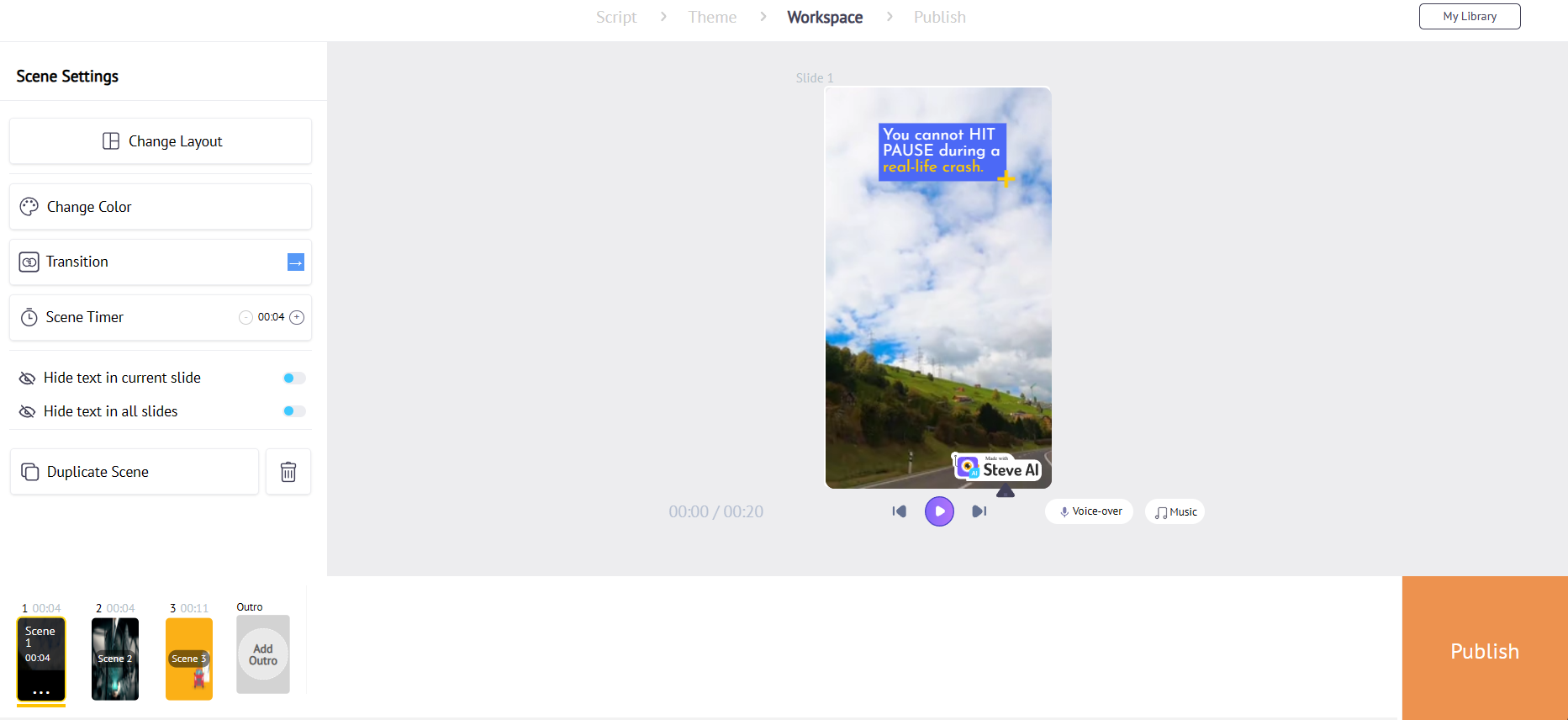
Get your lifetime software license for Steve.AI and discover how effortless it is to create videos.
Most Helpful Reviews for Steve AI
According to Trustpilot’s Steve AI reviews, this AI software got an overall 4.1 rating. It is commonly given 4 to 5-star ratings and reviews by 30 users across the globe. Check out these helpful reviews below.


This software is known for its user-friendly interface. It’s an excellent choice for beginners. Newbies in editing AI videos share their positive experiences when they use this tool to create videos.

Overall, this is an excellent tool for creating amazing videos.
How Can You Use Steve.AI in Your Own Business?
Here’s how this great tool can be handy for each of these professionals and businesses.
For Marketers. It gives a better way to create catchy promotional ads on social media platforms such as YouTube Channel, Instagram, and TikTok, among many others.
For Educators. It is a helpful resource to create videos for educational purposes. The best part is that teachers can share the content seamlessly with their students.
For Animators. Many creators find this beneficial because it simplifies video and animation production. It is easy to use. Even a rookie animator could use it to create videos!
Innovate your marketing strategy, teach smarter, or animate faster with this software.
Pricing Plans
Steve AI has free accounts and subscription plans starting from $15.00/month. Get video downloads, custom content, text-to-voice, and beyond by subscribing to these three plans:
Basic: $15/month
Starter: $45/month
Pro: $60/month

Steve AI also has downloads on a Pay As You Go basis, access to free media, and a quality music marketplace, enabling its subscribers to upload their assets.
Is it the Best AI Text-to-Video Converter?
Not really. However, Steve AI is a powerful tool that just keeps getting better. New product video templates and enhanced video editing are constantly added for future updates!
It needs more diversified media libraries, several bug fixes associated with its text-to-video on longer files, and improved voiceovers. Despite all this, it remains a valuable option for creating videos for content creators.
Steve AI Alternatives
Other amazing artificial intelligence tools are available on the internet than Steve AI. Let’s compare a few of them:
Kapwing. On Kapwing, you can make video content and tell your story. It’s an excellent platform for meme-making, gif-making, animations, and clip resizing on Instagram, Facebook, etc. It also provides the script editor feature and scene AI for several backgrounds, templates, animal characters, avatars, images, and memes.
InVideo. Templates offered by Invideo cover almost all industries. It’s user-friendly and provides astonishing outcomes that will certainly WOW your audience.
Clipchamp. Clipchamp provides a solid free version. It allows unlimited projects and includes basic feature sets for video makers. With ‘Premium,’ you can access stock, a template library, and high-resolution video downloads.
Explore these alternatives to see if they are suitable for taking your animation videos to new heights.
Steve AI Review: My Verdict
After thoroughly exploring and testing Steve AI, I give it 4 out of 5 stars. And here’s why.
Ease of Use. Steve AI has a user-friendly interface. It’s beginner-friendly. The platform has intuitive features like Text-to-Videos and Blog-to-Reels. It simplifies the process of making videos. No need to be a tech geek to create videos with this tool.
Functionality. It offers a range of functionalities that cater to various needs, from marketing to education. Its ability to transform text and audio into engaging videos is impressive. Steve.AI is a valuable asset for content creators.
Limitations. However, this software does have its drawbacks. The absence of a mobile app limits accessibility. Plus, the standard voiceovers could be more dynamic. The limited layout customization might also be a constraint for users seeking more creative control.
Pricing. Steve AI stands out thanks to its competitive prices. The various plans cater to different needs and budgets. It’s an affordable option for individuals and small businesses.
Overall, it’s a powerful tool for creating high-quality videos quickly and efficiently. While it may not be the absolute best in the market, it is definitely worth a try.


